
Reading view

If you use Google accounts, it’s time to do a free security checkup

Your Google account likely stores a lot of important information, from your home address in Google Maps and your work emails in Gmail, to family pictures in Google Photos and personal conversations in Google Chat. You don’t want anyone else gaining access to that data—and nor does Google.

To minimize the chances of anyone else accessing your account, Google has created a Security Checkup tool that you can use in any web browser. It takes you quickly and simply through a security audit, warning you about potential issues without overloading you with settings and menu screens.

If you’re logged into Google in your web browser, you can get to the Security Checkup tool from this page. Alternatively, you can find it from your Google account page, by clicking Security and sign-in (the Checkup should appear at the top).

Devices and sign-ins
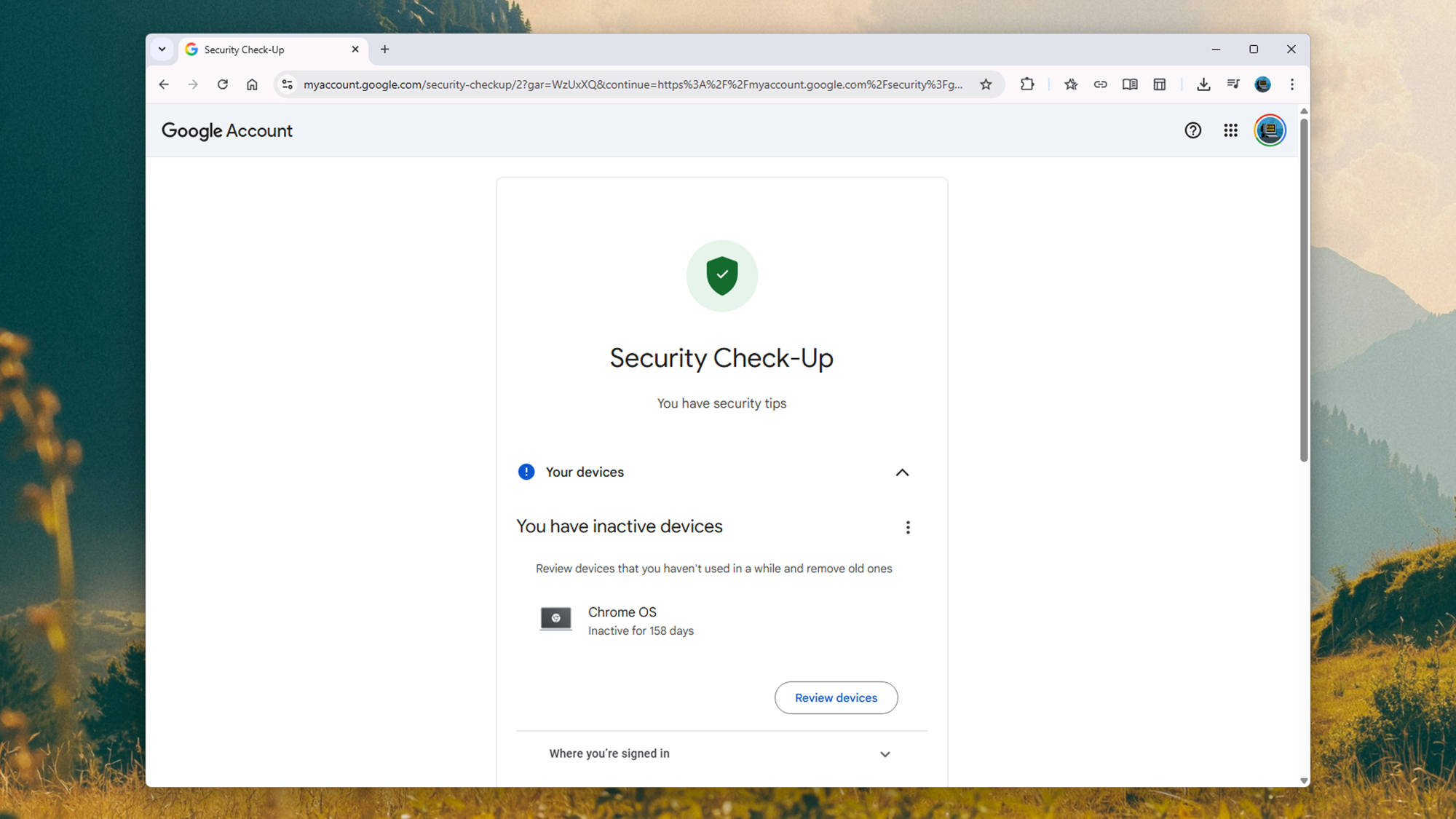
screenshot of security check-up
Any causes for concern will be flagged for you to review. Screenshot: Google

The Security Checkup will alert you to pressing problems that have been identified, but you can work through each section in turn, whether or not there are related issues. To start, you can see the devices that you’re currently signed into Google on under Your devices. It will also list their location, operating system, and when you last used them.

If there’s anything you don’t recognize here, or there’s a device you no longer have, you can disconnect it from your account remotely. It’s best to err on the side of caution here—if you accidentally disconnect a device that is actually genuine and that you are still using, the worst that’s going to happen is you’ll need to sign in again on that device.

Then we’ve got the Sign-in and recovery section. This contains crucial information about how your account is accessed, so make sure everything here is in order, and up to date. For example, you might be asked to confirm your backup email address and phone number, which will be crucial (and trusted) communication channels for Google to use should you somehow get signed out of your account.

Many devices now use passkeys, where you use something like a PIN code or a fingerprint scan to access your accounts. You can also see a list of passkeys you’ve set up here—and again, as with the list of devices, passkeys can be revoked if you see something that might be a problem (such as an authorization you don’t recognize).

Then you have the Your saved passwords section. If you’re using Android and Google Chrome to save login credentials to your Google account, then the stored passwords will appear here. Google will warn you if any passwords have been repeated or aren’t strong enough (usually because they’re not long or complex enough).

Browsing and activity

screenshot of apps connected
Review the apps and services that are connected to your Google account. Screenshot: Google

The Safe Browsing section of the Security Checkup is specifically for users of the Chrome browser, and gives you extra, proactive protection against dangerous websites and extensions. However, it also requires a greater level of data sharing with Google (so it can check your activity), and can feel restrictive for those who feel confident recognizing threats themselves—so the choice is yours.

Open Recent security activity, and you see a detailed list of all security-related activity on your Google account across the last 28 days. This will include activity such as devices you’ve signed in on, or deleted data you’ve recovered (something a hacker could potentially attempt to do). If anything here looks suspicious, you can alert Google.

Under Your third-party connections, you can see apps, sites, and services that have some kind of connection to Google. Maybe you use your Google credentials to log into them, for example, or they’re utilities that you use to manage your Google Photos account. Google-made smart home devices may also appear here.

The rules are the same as they are with connected devices: If you see anything that shouldn’t be there, you can break the link. The app or site in question will no longer have access to your Google account and its data. If you need to use it again, you’ll need to reapprove the connection. It’s a good idea to regularly review this list, to make sure older services that you no longer regularly use have been removed.

The final part of the Google Security Checkup is Gmail Settings, and from here you can view and make changes to email accounts you’ve blocked, and email accounts you’ve connected to. If you see anything that’s not right, you’re able to make changes. And with that done, your security checkup is complete—and your Google account should be significantly more secure than it was before.

The post If you use Google accounts, it’s time to do a free security checkup appeared first on Popular Science.


  •  

Watch adorable animals compete for best chewer in 2026 Crunch-a-Thon

Social media is widely considered to be bad for one’s mental health, at least anecdotally. However, it can have some positive impacts, such as videos of animals chewing food very loudly. What could possibly be better than a closeup of an animal’s snout as it crunches on a carrot? 

This week, zoos around the United States have been using social media to highlight one particularly cute muncher—tree kangaroos. Ahead of World Tree Kangaroo Day on May 21, conservation organization AZA SAFE (Saving Animals From Extinction): Tree Kangaroo of Papua New Guinea is inviting organizations working with tree kangaroos to compete in this year’s International Tree Kangaroo Crunch-a-Thon. 

In the aptly-named competition, participants posted videos on Instagram and/or Facebook of their tree kangaroo eating something. The competition categories are Most Likes, Most Views, and Judges’ Choice, and winners will be announced on May 17, Australian Eastern Standard Time. 

The organizers even provide crunchy food recommendations: bell peppers, celery, romaine hearts, snap peas, green beans, cucumbers, and zucchini—with the caveat that the last two vegetables might not have the best crunch. 

“In partnership with the AZA Tree Kangaroo SAFE program, we’re participating in the Tree Roo Crunch-a-Thon to help shine a spotlight on this endangered species,” reads a social media post by Roger Williams Park Zoo & Carousel Village featuring three munching, pink-nosed brown and white tree kangaroo. “Our Zoo is home to three Matschie’s tree kangaroos – a species of tree kangaroo native to the cloud forests of Papua New Guinea.”

Tree kangaroos are 14 species in the Dendrolagus genus, the sole arboreal kangaroo group. They are herbivorous marsupials with bushy tails, and usually have long arms and padded back feet. Tree kangaroos live in parts of Australia, Indonesia, and New Guinea’s rainforests. The Golden-mantled tree kangaroo (Dendrolagus pulcherrimus) is among the world’s most endangered mammals and only lives in a small area of Papua New Guinea. 

In the words of the Crunch-a-Thon organizers, “let the crunching begin!” 

The post Watch adorable animals compete for best chewer in 2026 Crunch-a-Thon appeared first on Popular Science.

  •  

This guy crammed a laptop into an Altoids tin

Leftover Altoid tins are staple components in all types of handy, DIY projects. Once you eat the mints, the aluminum containers routinely house basic first aid kits, miniature speakers, sewing accessories, and even watercolor paints. But for the YouTuber Exercising Ingenuity, one specific use came to mind.

“Have you ever looked at a tin of Altoids and thought, ‘That looks like a tiny computer?’” he asked in a video on May 9.

Of course, whether or not you imagined the same endeavor is beside the point—because the creator went ahead and did it. The final result may not be the most versatile pocket computer ever designed, but it definitely is one of the most portable.

Exercising Ingenuity was particularly inspired by cyberdecks, which first rose to prominence among hackers during the 1980s. The term originated in William Gibson’s landmark 1984 science fiction novel Neuromancer, and basically boils down to a rugged standalone laptop (with a little bit of punk flare thrown in for good measure). Most actual cyberdeck projects are built with an emphasis on utility and resilience, but Exercising Ingenuity’s chief goal was to make his variant as small as possible.

The problem wasn’t finding an appropriately tiny CPU and LCD screen—a Raspberry Pi Zero and an old, two-inch display both did the trick. Instead, the more difficult challenge was cramming a mechanical keyboard into the pocket-sized tin. That required learning how to construct a diode matrix configuration typing input, then individually assembling and soldering each key on his keyboard. Although the time-lapse video makes the job look incredibly frustrating and hard on the fingers, the YouTuber swears it was a “really enjoyable part of the project.” To each their own.

Hands typing on miniature keyboard connected to computer components and small LCD screen
Typing will remain a challenge unless you have very small fingers. Credit: YouTube

From there, it was a matter of designing a flexible 3D-printed interior frame and cramming everything into the tin. This was easier said than done, and required the hobbyist to trim down as much wiring as possible while also soldering parts like the UPS board and LCD display directly onto the Raspberry Pi. Despite literally and figuratively cutting every possible corner to make room for all of the components, the final result still required swapping out the tin’s hinges with slightly larger replacements to ensure the case could close shut.

With every hurdle cleared, it was simply a matter of booting up the contraption to give it a test run. Exercising Ingenuity says the final product worked flawlessly, and he was even able to program a small motor to run using his Altoid cyberdeck. Actually typing on the keyboard still looks like a labor of love, but the overall result remains very cool. Its inventor even made all of the designs available online for free, in case any aspiring cyberpunks are looking to recycle an old mint tin.

​​In The Workshop, Popular Science highlights the ingenious, delightful, and often surprising projects people build in their spare time. If you or someone you know is working on a hobbyist project that fits the bill, we’d love to hear about it—fill out this form to tell us more.

The post This guy crammed a laptop into an Altoids tin appeared first on Popular Science.
  •  

Game teaches kids programming basics without screens

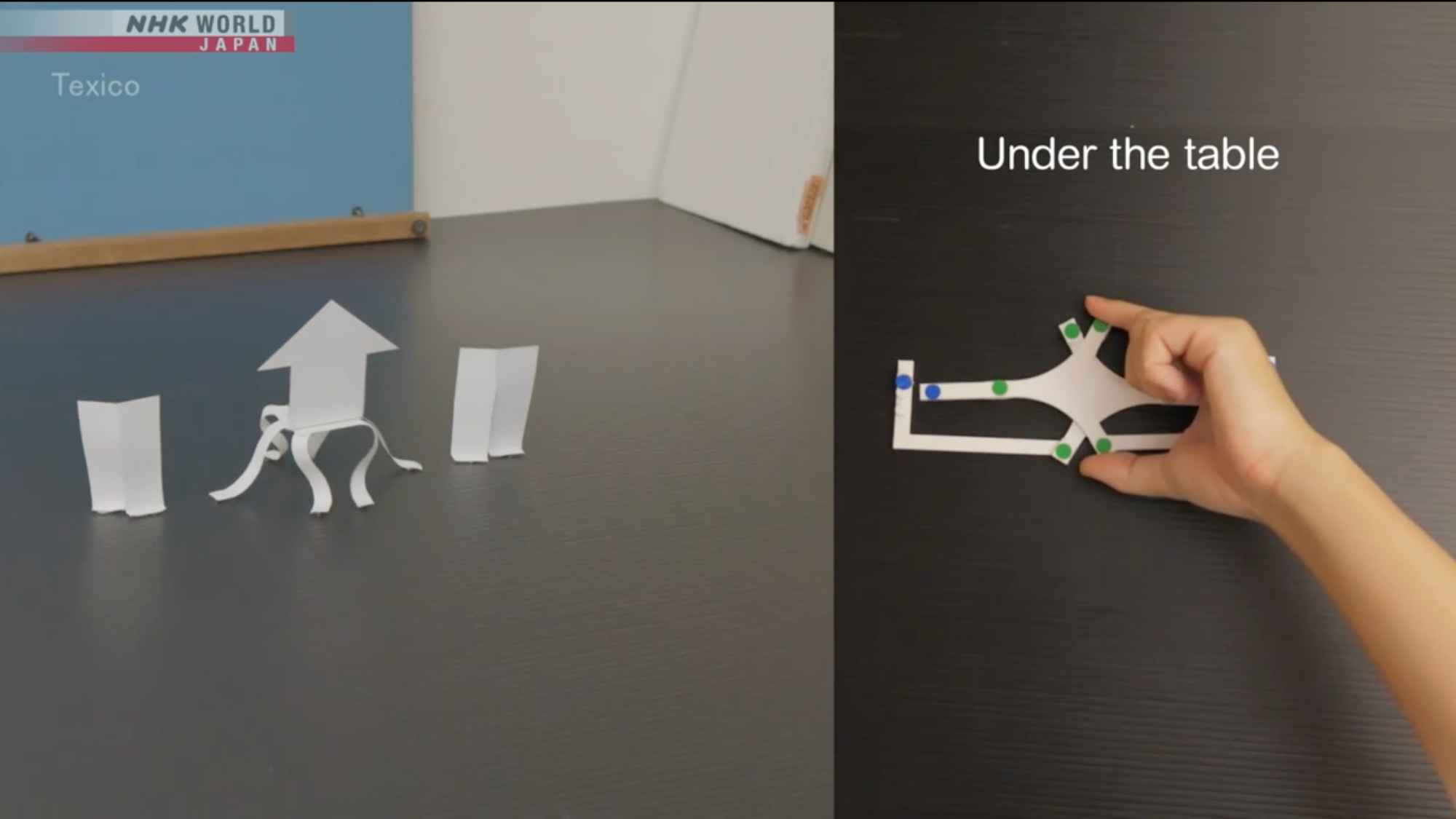
Parents around the world are responding to growing research showing that excessive screen time, especially for young children, may have negative cognitive effects. But what happens when a well-meaning parent wants to introduce their child to subjects intrinsically linked to screens, like computer programming? A new learning series from Japanese public broadcaster NHK called Texico aims to help solve that dilemma by using paper, plastic toys, and everyday objects to break down the core concepts and strategies essential to programming.

Each episode in the series runs about 11 minutes and focuses on key concepts including analysis, combination, abstraction, and simulation. The goal, NHK says, is to help children “learn the principles of programming without even touching a computer.”

playing cards on a green table
Each 11 minute episode breaks down some of the essential strategies needed for programming. Image: Texico.

‘If you think hard enough, you can see the underlying logic,’

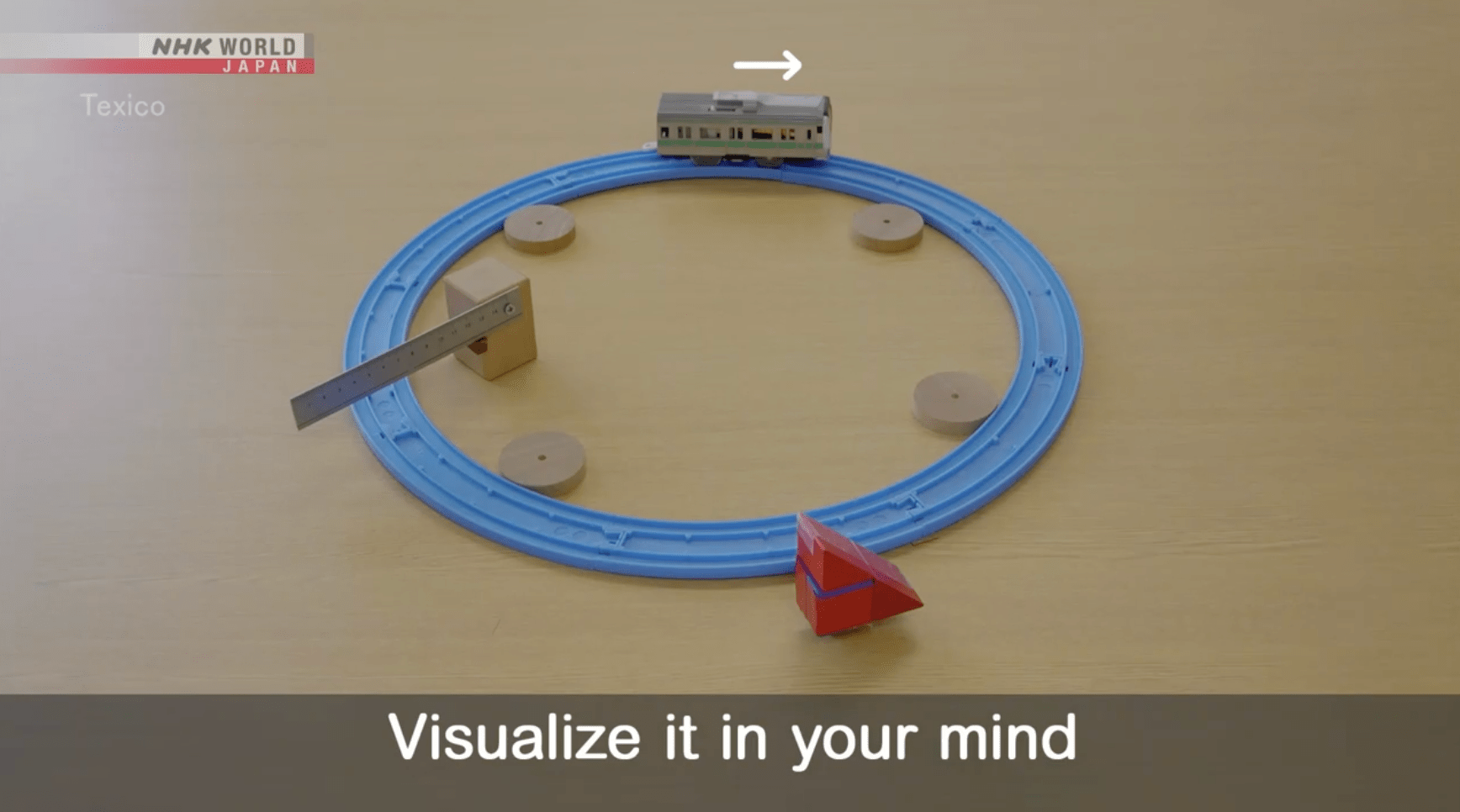
In one episode, a toy train on a plastic track approaches a lowered rail crossing. Viewers are asked to visualize what will happen when the train makes contact with the barrier. In this case, both the train and the lowered rail continue moving forward.

The next segment complicates the scenario: the track now forms a circle, with the train, rail, and a wooden triangle block all positioned at different points. When the rail moves, so does the block. Viewers are asked to recall what happened in the previous example and apply that logic to the new configuration, essentially practicing the kind of mental simulation that underlies real programming work.

Another episode teaches foundational logic by asking viewers to tear a sheet of paper into nine pieces. A teacher then selects one piece and instructs the viewer to write a number from one to nine and place it face down. The viewer then writes the remaining numbers on the other pieces, also face down, so the teacher can’t see it. The teacher then somehow correctly guesses which piece holds which number. 

But the trick isn’t magic. Instead, it has everything to do with the geometry of tearing paper. It’s revealed that the first piece the teacher selected was the center of the sheet. When paper is torn into nine equal pieces, the center piece is the only one without any straight edges. So when the teacher went to identify it, they simply looked for the piece that didn’t look like the others. 

It’s a simple but elegant demonstration of the kind of pattern recognition that programmers rely on constantly.

“If you think hard enough, you can see the underlying logic,” a voice in the video says, followed by the slightly creepy musical mantra “Texico, Texico, Texico.” 

blue train tracks arranged in a circle on a brown table
The train track can mimic what is going on inside the brain when doing real programming. Image: Texico.

The pull away from screens 

Offline approaches to teaching computer concepts provide a way for newcomers of all ages interested in coding to get their feet wet without having to deal with distracting screens. For many, that’s a welcome reprieve. A recent YouGov poll found that more than half (57 percent) of adults in the United States spend at least five hours per day looking at screens. All that time starting into the digital glow has been shown to interfere with sleep and, in some cases, even contribute to anxiety and other mental health issues

Screenless learning could also prove popular as parents and school districts push back against what many now see as an overreliance on screens. More  than 35 states have enacted policies limiting smartphone use in classrooms. Districts in California and Oregon have recently gone further, adopting rules that restrict student use of laptops and tablets and prioritize pen and paper. Should that trend spread, it would mark a stark departure from the past two decades, during which “EdTech” was enthusiastically embraced and widely deployed in classrooms across the country.

“We are prioritizing developmentally appropriate learning during the most critical period for language, social, and cognitive development,” Jeanne Grazioli, a superintendent in a Southern Oregon schools district said after they moved to reduce screen time.

And while the debate over screens is far from settled, there is growing evidence that introducing concepts through analog methods pays dividends later on. In his recent book The Digital Delusion, neuroscientist and educator Dr. Jared Cooney Horvath points to research suggesting that students who learn to write by hand retain an advantage over those who move straight to typing, despite the fact handwriting has become increasingly less common in daily adult life. 

”Many people believe that thinking happens entirely in the brain, as if we’re just gray matter hitching a rise inside a body,” Horvath writes. “But this misses something essential: we don’t merely have bodies—we are bodies. Learning doesn’t arise from the brain alone, it emerges from the rhythms, movements, and sensations of our entire physical selves.” 

“Put simply, handwriting builds a foundation that typing cannot,” he adds. 

Something similar may be at work when children learn programming basics through analog tools. And even if future research doesn’t bear that out conclusively, Texico offers something valuable on its own terms: a set of refreshing, screen-free puzzles that challenge young learners  (and at least one adult tech writer) to flex their critical thinking skills. 

The post Game teaches kids programming basics without screens appeared first on Popular Science.
  •  

Clever kid builds phone charger powered by pet hamster

Renewable energy is the cornerstone of any sustainable society, but why limit your options to wind or solar installations? In the United States alone, over one million homes host a tiny, furry alternative power source without even realizing it. As a young YouTuber known as Flamethrower recently demonstrated, it’s time for hamsters to start pulling their weight around the house. Or, at the least, it’s time for them to start turning hamster wheels into miniature, makeshift turbines.

The idea came to Flamethrower after his brother received one of the tiny pets for his birthday. Although adorable, naturally nocturnal hamsters are often up at all hours of the night running on their little exercise accessories. While laying awake to the sound of a spinning, squeaky wheel, the amateur engineer realized how to make the best of an unexpectedly annoying situation.

“So what did I do? Exploit it for energy production, of course!” he declared in his recent video entry.

Turbines help generate most of the world’s energy, and their underlying principles are simple enough. Electricity funneled through wires to a motor will make it spin, but the reverse is also true—spin a motor, and electricity will generate through its terminals into battery storage. The fundamentals are basically the same whether a turbine spins thanks to steam, wind, or nuclear power. Or hamsters.

However, a hamster-powered turbine is not the easiest project to design. As the YouTuber explained, a 5 volt (V) DC motor hypothetically needs to spin at over 10,000 RPM to simply reach a smartphone’s standard 15 watt charging speed. Even if such a superpowered hamster existed, its speed would likely cause the motor to melt before it provided any juice to a battery—and therein lay another issue. 

Batteries don’t only store energy—they are designed to provide electricity at a steady current when needed. However, a standard battery also must receive a higher voltage than it stores in order to amass any reserves. 

Part of the solution came from a device known as an energy harvester module, which takes small voltages and amplifies them to an acceptable level for a battery. But the problem is that the amount of required voltage increases in direct proportion to the energy that’s being stored, meaning yet another unfeasible hurdle. The hobbyist ultimately relied on a system called maximum power point tracking (MPPT) to calculate the optimal input and output proportions for the energy harvester and a few other components. 

All that potential energy is only as good as the battery that stores it, however. For this project, the YouTuber relied on lithium-ion cells salvaged from a broken electric scooter. Flamethrower hooked up his rig to the hamster wheel’s axis, then gave his brother’s pet the night to get its steps in. The next day, he attached his phone via a USB cable charging port to test the whole thing for the first time.

The initial setup worked flawlessly, although it charged at a snail’s pace. Naturally, he booted up his thermal camera nearby (who doesn’t own one?) to investigate any pain points in the system. It turns out the issue did have anything to do with the hamster wheel charger itself, but his outdated USB cable. After swapping that out with a newer replacement, phone charging sped up dramatically.

“And with that, my hamster’s life finally has a purpose,” the inventor declared.

As absurd as it appears, it’s hard to argue with such an ingenious source of free electricity. Hypothetically, the same idea could be adapted to basically anything in a house that spins mechanically, like a stationary bike. Then again, the whole point is to have the hamster do the work, not you. In any case, the YouTuber seems to be on to something here. The way Flamethrower tells it, the rodent may be more reliable than solar or wind energy.

“It’s supposed to be nocturnal but I’m starting to think it never sleeps,” he said.

In The Workshop, Popular Science highlights the ingenious, delightful, and often surprising projects people build in their spare time. If you or someone you know is working on a hobbyist project that fits the bill, we’d love to hear about it—fill out this form to tell us more.

The post Clever kid builds phone charger powered by pet hamster appeared first on Popular Science.

  •  
❌